 Posted on January 28, 2025 by Nate_007 Reads:
 Welcome to N1Dev-blog. This article will show you how to use the platform to create your own blog article using the N1Dev-Blog platform. Firstly, to create a blog post you will need to have a registered and validated account, to sign up click the sign-up button found in the navbar.

After signing up you’ll get the option to Post in the navbar

for each blog article it will need a title and summary to help readers get brief information about the article and this will also allow the search engine to match results. Make sure to keep your summary brief and to the point as there is a 255-word limit.
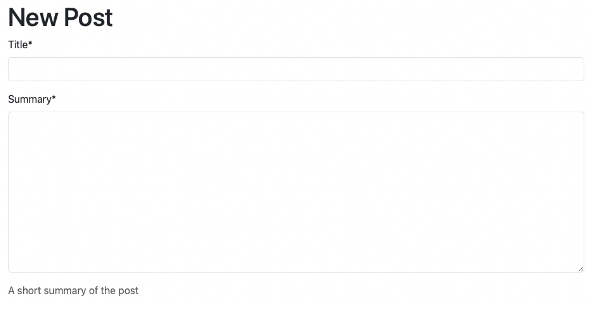
The title will display with the post date and your avatar in the article like this.

The summary will display in the list of blog articles on the home page.

For the body of the blog article, it uses a rich text editor so that images and styling can be added to the article. The editor also has a code block feature to allow for code snippets to added this will allow readers to copy the code and try it for themselves.
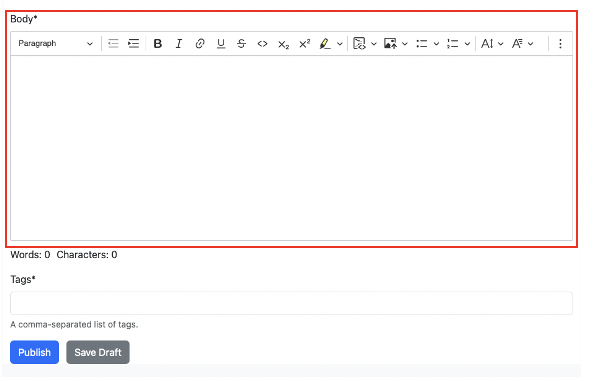
After creating the content, you can use keywords in the tag section, this will also help the search engine find you article based on the keywords (tags). The keywords can be compounding or singular, to separate them use a comma. Eg Python Django, Django, Python, Web Framework each comma defines the keyword.
If you just want to compile the article in the webpage you also have the option to save a draft and then return to your draft and continue to edit and save until its ready to publish. When a post is in draft its hidden from other users and signified to you as a draft

Happy blogging and remember to keep it PG, original and most of all have some fun sharing your knowledge with the world.